Remember the days of scrolling through endless food databases, squinting at portion sizes, and hoping you picked the right variation of "chicken breast"? If you've been tracking with apps like MyFitnessPal, you know the pain. Every meal logged felt like detective work.
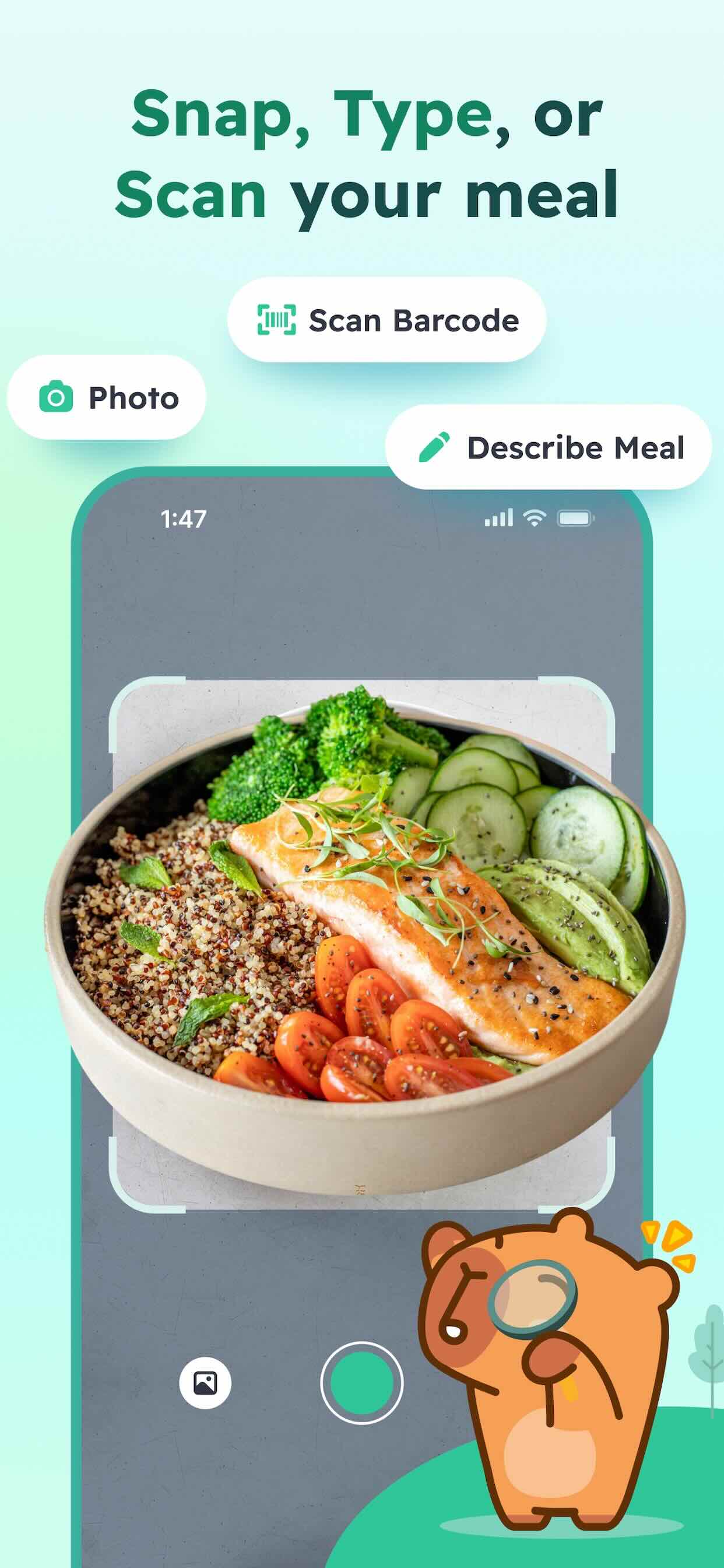
Now there's a better way. With AI-powered food recognition, you just snap a photo. The app does the rest—identifying what you ate, estimating portions, and logging it in seconds. But how does that actually work? Let's dive in.
The Old Way vs. The New Way
The Manual Search
- 1. Take a bite (and remember exactly what you ate)
- 2. Open app, search food database
- 3. Scroll through similar items (which one was it again?)
- 4. Guess the portion size
- 5. Log it (and hope you were close)
Time: 3-5 minutes per meal
The AI Snap
- 1. Snap a photo of your meal
- 2. AI instantly recognizes what's there
- 3. AI estimates portion sizes from the image
- 4. Review and adjust if needed
- 5. Done—logged and tracked
Time: 10-15 seconds per meal
How AI Food Recognition Works
Here's the thing: AI food recognition isn't magic. It's pattern recognition at scale. Think of it this way—when you see a slice of pizza, you instantly know it's pizza. You don't consciously think through "round, tomato sauce, melted cheese, crust." Your brain learned from thousands of pizza examples and just knows.
AI learns the same way, but with millions of food images instead of thousands.
1. Computer Vision: Teaching the AI to See
When you snap a photo, the AI doesn't just look at the pixels. It uses something called a "neural network"—basically a digital brain with billions of tiny connections. These connections have been trained on millions of food photos, learning to recognize patterns: textures, colors, shapes, arrangements.
The AI breaks down your meal photo into layers of detail. First layer: "This is round and red." Next layer: "This looks like vegetables." Next: "Those are tomatoes." Eventually: "This is a tomato-based pasta dish."
2. Food Identification: What's Actually on That Plate?
Once the AI "sees" your meal, it has to name it. The system compares what it sees to thousands of known food categories. It doesn't just say "chicken"—it tries to identify "grilled chicken breast," "rotisserie chicken," "breaded fried chicken" because those are nutritionally different.
Here's the clever part: AI can often identify multiple items in a single photo. That salad with chicken, croutons, and dressing? The AI can break it down into components, recognizing each ingredient separately.
3. Portion Estimation: How Much, Exactly?
This is where it gets really sophisticated. The AI doesn't just guess "medium chicken breast." It uses visual cues from your photo to estimate actual size. It looks at the plate diameter (most plates are standard sizes), the thickness of the food, and density. If your chicken is stacked next to a side of rice, the AI can cross-reference those sizes to better estimate portions.
The system is designed to be slightly conservative with portion estimates—it's better to overestimate a bit than underestimate. But you always get to review and adjust.
The AI Food Logging Flow
Snap
Take a photo of your meal
AI Recognizes
Identifies items & portions
Review & Adjust
Fine-tune if needed
Logged!
Instantly tracked
Why Accuracy Keeps Getting Better
Here's the magical part: your AI food logger gets smarter the more you use it. Every time you verify or adjust something, the system learns. If the AI says "grilled salmon" and you correct it to "pan-seared salmon with butter," the system notes that pattern—your kitchen, your cooking methods, your food preferences.
This is machine learning in action. The model isn't static. It continuously learns from new food photos, new food trends, and user corrections. AI systems trained on 2024 food photos will be better than ones trained on 2022 photos, simply because people keep eating new things and new food variations exist.
Your personal food history also helps. If you log 50 meals from your favorite restaurant, the AI learns your go-to orders. Next time you snap a photo there, it might suggest "your usual tuna poke bowl" before offering other poke variations. It's personalized AI.
Beyond Photos: Barcode Scanning & Text Input
AI photo recognition is powerful, but it's not the only way to log food. CapyCal works seamlessly with other methods:
Barcode Scanning
For packaged foods, scan the barcode for instant nutritional data. No guessing needed.
Text Search
Can't snap a photo? Type what you ate. Still faster and easier than old database hunting.
Smart Combinations
Most meals get logged with a combo—photo for the main dish, barcode for the protein bar, text for water intake.

Meet Capy Pro
Your intelligent food tracking companion powered by the latest AI technology. Capy Pro uses advanced computer vision to recognize meals instantly, learns your preferences over time, and makes tracking feel less like work and more like second nature.
Fine-Tuning: The Ingredient Adjustment Feature
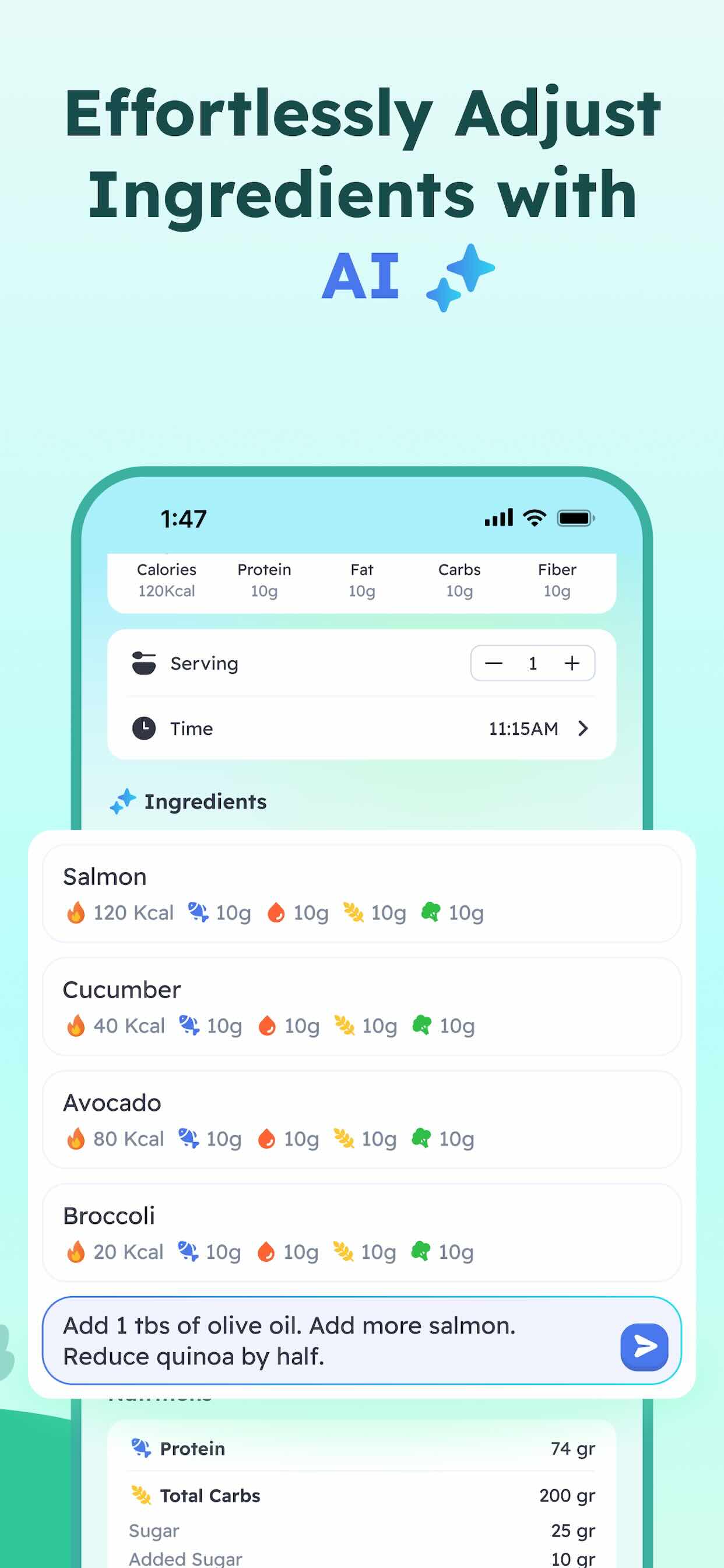
Perfect AI doesn't exist. Sometimes the AI gets it wrong—or partially right. That's why CapyCal includes powerful adjustment tools. When the AI logs "caesar salad with dressing," you can:
- • Swap ingredients (remove croutons, add extra chicken)
- • Adjust portions (make it a smaller bowl)
- • Add hidden items (butter in the pan, oil in the dressing)
- • Correct cooking methods (if it guessed fried, change to grilled)
These adjustments teach the AI. Do it consistently, and next time you eat something similar, the AI will be smarter about it. You're actively improving the system while getting accurate results today.
Ready to Stop Manual Logging?
Experience AI-powered food tracking that actually fits your life.

What This Means For YOU
⚡
Faster Tracking
From 5 minutes per meal to 15 seconds. Logging becomes friction-free.
🎯
More Accuracy
AI portion estimation beats manual guessing. You get reliable data.
😊
More Enjoyable
Tracking stops feeling like homework. It becomes effortless.
If you've been frustrated with traditional food logging—if you switched from MyFitnessPal looking for something better, or if you've never tracked before because it seemed too tedious—AI photo food logging changes everything. It's not just a feature. It's a fundamental shift in how tracking works.
The technology is here. It's accurate. And it keeps getting smarter. All you have to do is snap a photo. The AI handles the rest.
Try AI Photo Food Logging Today
CapyCal's AI recognizes your meals instantly. No more endless searching. No more guessing portion sizes. Just snap, review, and log.
Get Started Now
CapyCal works on iOS 13+. Free 14-day trial. No credit card required.